
If you want to understand cyber security, hacking, or even online safety, there is one thing you must learn first — how the internet and websites actually work.
Most beginners jump directly into attacks like phishing, SQL injection, or malware. But professional hackers and defenders always start with fundamentals. Why? Because every cyber attack depends on how data travels on the internet.
In this guide, we’ll break everything down in simple language, with real-life examples, so anyone can understand — even if you have no technical background.
Why Understanding the Internet Is Important for Cyber Security
Cyber security is all about protecting digital assets like websites, accounts, and data. To protect something, you must first understand how it functions.
Hackers don’t use magic.
They exploit:
- Weak communication
- Poor configurations
- Misunderstood systems
Once you understand how the internet works, you’ll naturally understand:
- Where attacks happen
- Why vulnerabilities exist
- How defense mechanisms protect data
This knowledge forms the foundation of both attack and defense.
What Is the Internet? (Simple Definition)
In the easiest words:
The internet is a global network of computers connected to each other.
These computers:
- Share data
- Communicate using rules
- Send and receive information
Your laptop, mobile phone, and servers across the world are all part of this massive network.
Simple Analogy
Think of the internet like a worldwide road system:
- Computers = houses
- Data = vehicles
- Internet = roads connecting them
What Is a Website?
A website is simply a collection of files stored on a computer called a server.
These files include:
- Text
- Images
- Videos
- Code
When you visit a website, you’re actually asking another computer somewhere in the world to send you its files.
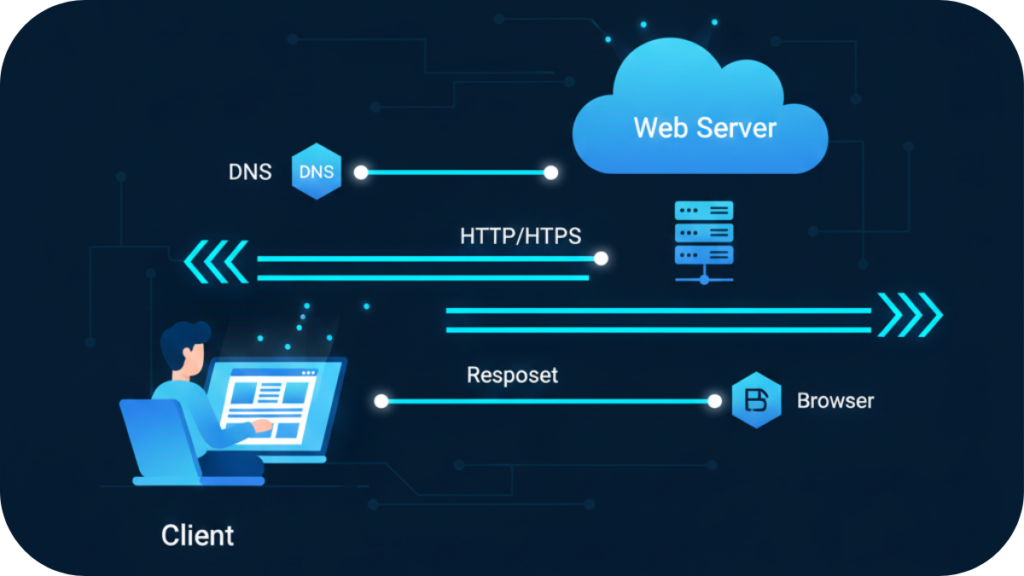
What Happens When You Type a Website URL?
Let’s break this into clear steps.
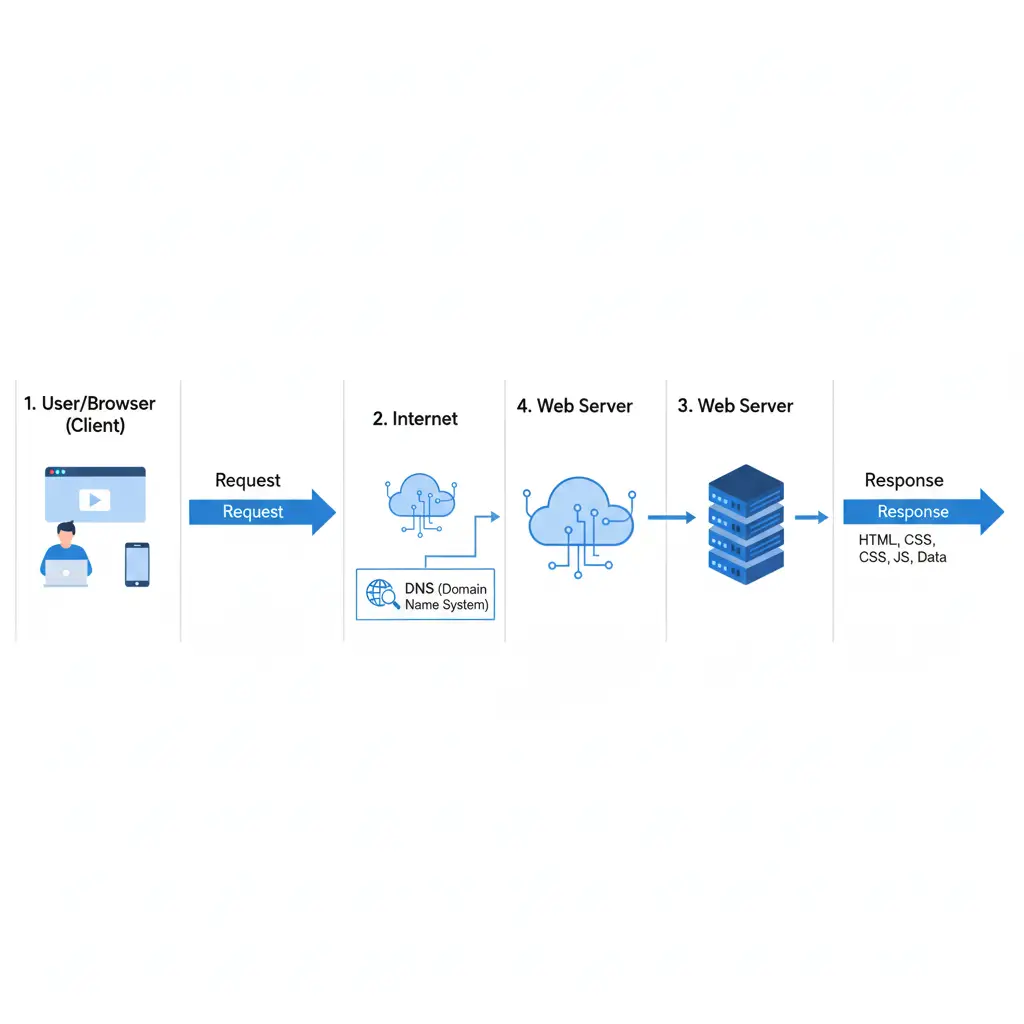
Step 1: You Type a URL
You type something like:
www.example.com
Your browser doesn’t understand website names — it understands IP addresses (like phone numbers for computers).
Step 2: DNS Finds the Website
DNS (Domain Name System) converts:
example.com → 93.184.216.34
This tells your browser where the website lives.
DNS is like a phonebook for the internet.
Step 3: Browser Sends a Request
Your browser sends a request to the server:
“Please send me the website.”
This request travels through the internet.
Step 4: Server Sends a Response
The server receives your request and sends back:
- HTML
- CSS
- JavaScript
- Images
Step 5: Website Appears on Your Screen
Your browser reads these files and builds the website visually.
All of this happens in milliseconds.
Client and Server Explained Simply
This relationship is at the heart of how websites work.
Client
- Your browser
- Requests data
- Displays the website
Server
- Stores website data
- Processes requests
- Sends responses
Simple Example
Like a restaurant:
- You (client) order food
- Kitchen (server) prepares it
- Food (data) is delivered
Role of a Web Browser
Your browser does much more than just open websites.
It:
- Sends requests
- Receives responses
- Understands HTML, CSS, JavaScript
- Stores cookies
- Manages sessions
Popular browsers:
- Chrome
- Firefox
- Edge
- Safari
From a security point of view, browsers are a major attack surface, which is why browser security is critical.
What Is a Web Server?
A web server is a computer designed to serve websites.
It:
- Stores files
- Handles requests
- Communicates with databases
Common web servers:
- Apache
- Nginx
- Microsoft IIS
If a server is misconfigured, attackers may:
- Access sensitive files
- Steal data
- Take control of websites
What Is HTTP and HTTPS?
HTTP (Hypertext Transfer Protocol)
- A set of rules for communication
- Data is sent in plain text
HTTPS (Secure HTTP)
- Encrypted communication
- Protects data from attackers
Why HTTPS Is Important
Without HTTPS:
- Passwords can be stolen
- Data can be modified
- Sessions can be hijacked
That’s why modern browsers warn users when a site is not secure.
How Data Travels on the Internet
Data doesn’t move as one big piece.
Instead:
- It’s broken into small packets
- Each packet travels separately
- Packets are reassembled at destination
Simple Analogy
Sending a book page by page instead of all at once.
This design makes the internet:
- Faster
- More reliable
- More scalable
Where Cyber Attacks Fit In
Now let’s connect this to cyber security.
Different attack types target different parts:
- DNS → DNS spoofing, redirection
- HTTP → XSS, CSRF
- Cookies → Session hijacking
- Servers → SQL Injection, file inclusion
- Users → Phishing, social engineering
Understanding the internet helps you see where attacks happen and why.
Why Hackers Learn Internet Basics First
Professional hackers don’t randomly try things.
They ask:
- Where does data flow?
- Where is trust assumed?
- Where is validation missing?
Once they understand this, finding vulnerabilities becomes easier.
You can’t defend what you don’t understand.
That’s why defenders must learn the same fundamentals.
Internet Knowledge = Better Defense
If you understand:
- Requests & responses
- Client-server model
- HTTPS importance
You’ll naturally:
- Avoid unsafe websites
- Recognize suspicious behavior
- Implement stronger security
This is the true mindset of cyber security.
Final Thoughts
The internet may feel complex, but at its core, it’s simply computers talking to each other.
Once you understand:
- How websites work
- How data moves
- How communication happens
You’re no longer just a user — you’re someone who understands the system.
This knowledge prepares you for learning:
- Cyber attacks
- Vulnerabilities
- Defense techniques